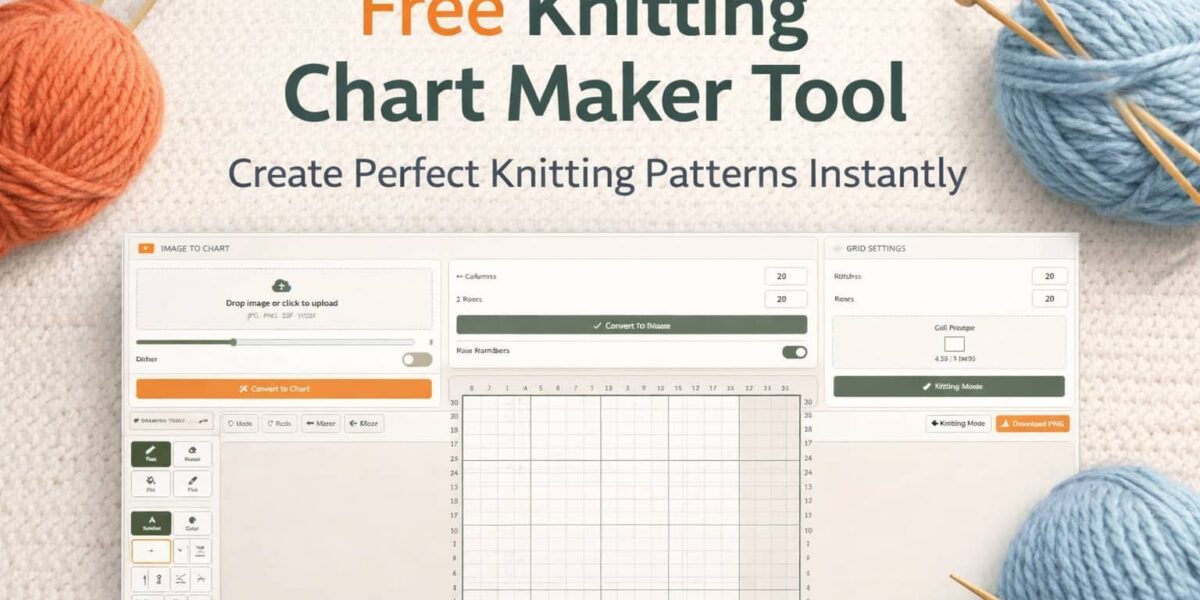
You’ve got a design in your head. Maybe it’s a Fair Isle yoke, a lace panel, or a cable repeat you’ve been sketching on graph paper for weeks. Then you open a “free” online knitting chart tool — and hit a wall. The grid expands off the screen. The symbols cost extra. Downloads slap a watermark across your pattern. You can’t follow the chart row by row without losing your place on a sea of identical cells.
This is the dirty secret of most free knitting chart makers: they’re not actually built for knitters.
Gauge Genie’s knitting chart maker was designed to fix every single one of those frustrations — for free, forever. Whether you’re charting a 10-stitch lace repeat or a 120-column colorwork yoke, the grid fits your screen, your symbols are all included, and your download has zero watermarks.
Key Takeaways
| Always-Fit Grid | 100+ columns or 80+ rows — cells auto-scale, no sideways scrolling ever |
| Image to Chart | Convert any photo into an editable colorwork chart in seconds |
| Gauge-Accurate Cells | Cell proportions match your real knitted fabric, not square graph paper |
| 25+ Free Symbols | Knit, purl, YO, K2tog, SSK, cables, bobbles, nupps — all included |
| Knitting Mode | Follow row-by-row with RS/WS labels and single-row highlighting |
| Free PNG Download | High-res, watermark-free, usable in paid or free patterns, no attribution |
What Is a Knitting Chart Maker?
A knitting chart maker is a digital tool that lets you create visual, grid-based representations of knitting patterns. Instead of writing out row-by-row text instructions like “K2, P1, YO, K2tog, repeat to end,” you place symbols on a grid — and the chart tells the story at a glance.
Charts are particularly indispensable for:
- Colorwork — stranded, Fair Isle, and intarsia patterns where color placement needs to be precise
- Lace patterns — YOs, decreases, and double yarnovers that are nearly impossible to convey in text
- Cable designs — complex crossings with directional symbols that make the structure immediately readable
- Mosaic and slip-stitch patterns — where color sequence per row is the whole design
For pattern designers, reliable knitting chart software is as essential as a row counter. For home knitters, a chart can turn a confusing text repeat into something you can actually follow while watching TV.
Why Most Free Knitting Chart Tools Fall Short
Before diving into what makes a great tool, it’s worth naming what makes most options genuinely frustrating.
The Watermark Problem
You spend an hour charting a beautiful 40-row lace repeat. You export it — and there’s a brand logo stamped across it. If you’re publishing a paid pattern, this isn’t just annoying. It’s unusable.
The Scroll-Forever Grid
Some tools let you add rows and columns without limit, but the page just expands. Suddenly you’re scrolling sideways to find column 60, and your trackpad is staging a revolt. Working on a large colorwork chart becomes a navigation exercise instead of a design exercise.
Symbols Locked Behind Paywalls
Free tier gets you knit and purl. Everything else — YOs, decreases, cables — sits behind a subscription. That’s not a free knitting chart maker. That’s a demo with a free label.
Gauge Genie: Built by Knitters, for Knitters
Gauge Genie addresses every one of those pain points head-on. Here’s a feature-by-feature breakdown.
- 📐Always-Fit GridCells auto-scale — never scroll sideways
- 🖼️Image to ChartK-means photo conversion
- 📏Gauge-AccurateReal stitch proportions
- 🧵25+ SymbolsAll industry-standard, all free
- 🔦Knitting ModeRow-by-row RS/WS guide
- ⬇️Free PNG ExportNo watermarks, ever
Always-Fit Grid: No More Sideways Scrolling
This is the one that changes everything. Add 100 columns, add 80 rows — the cells auto-scale to fit your screen. The page never expands. The chart is always right in front of you, no matter how large your design grows.
For designers working on full-yoke colorwork or deep stitch repeat libraries, this single feature alone is a reason to switch tools.
Image to Chart: The Feature No Other Free Tool Has
This is Gauge Genie’s most distinctive capability. Upload any photograph — a geometric tile, folk embroidery, a logo, a landscape — and the tool’s k-means color clustering algorithm converts it into a colorwork knitting chart in seconds.
- Upload your photo using the Image to Chart panel
- Choose your color count (how many yarn colors you want to work with)
- Toggle dithering on or off for different visual effects
- Click Convert — your fully editable colorwork chart appears instantly
Gauge-Accurate Cell Proportions
Gauge Genie solves the square-grid problem by letting you enter your stitch and row counts per 4 inches. Cells adjust their aspect ratio to match your real knitted fabric.
Example: If your gauge is 22 stitches × 28 rows per 4 inches, your cells will be slightly taller than wide — exactly how those stitches knit up. What you see on screen is a genuine preview, not a geometric lie.
25+ Industry-Standard Symbols — All Free
The symbol library covers the full range of standard knitting notation with no upsells and no locked tiers:
- Basic stitches: Knit, Purl, Slip, No Stitch
- Increases: YO, KFB, M1L, M1R
- Decreases: K2tog, SSK, K3tog, SK2P, double decreases
- Cables: Left and right crosses — 2/2, 3/3, and more configurations
- Special: Bobbles, Nupps
Knitting Mode: Follow Your Chart As You Knit
Click Knitting Mode and the chart transforms from a design tool into a live working companion. One row highlights at a time, bottom to top — exactly the direction you knit. RS/WS labels appear automatically. Use Prev Row / Next Row to advance as you work.
How to Use Gauge Genie: Step-by-Step
Set Grid
Enter columns and rows. Cells auto-scale — the page never expands no matter how large you go.
Enter Gauge
Input stitches and rows per 4 inches. Cells adjust proportions to reflect real knitted fabric.
Image to Chart
Upload a photo, pick color count, toggle dithering, click Convert. Editable chart in seconds.
Draw
Choose Symbol or Color mode. Use Pen, Fill, Eraser, or Pick tool. Click and drag across cells.
Knitting Mode
One row highlights at a time, bottom to top. RS/WS labels shown automatically as you work.
Download PNG
Exports with row numbers, symbol legend, and repeat bracket. No watermarks — ever.
Ctrl+Z Undo · Ctrl+Y Redo · Mirror flips the chart horizontally · Pick tool samples any existing color or symbolExpert Tips for Better Knitting Charts
Use Gauge Entry Even for Simple Charts
Even if you’re not charting for a specific yarn, entering a realistic gauge (20 sts × 26 rows per 4 in is a good default for DK weight) gives you a far more accurate visual of how the pattern will look knitted up.
Start With Image-to-Chart for Colorwork Inspiration
Don’t know what colors to use or how to structure your motif? Upload a photo of a fabric, tile, or painting you love. Let the k-means conversion give you a palette and structure — then refine from there. It’s the fastest way from inspiration to chart.
Use Fill for Large Colorwork Sections
When painting large background areas, the Fill tool is dramatically faster than the Pen. Map out your background color first with Fill, then draw your motif cells on top with the Pen. Work from large to small.
Mirror for Symmetric Motifs
Design half your motif, then use the Mirror function to flip it horizontally. Perfect for centered cable panels, symmetric colorwork medallions, or any design with a vertical axis of symmetry.
Ctrl+Z/Ctrl+Y during a session, but download a PNG checkpoint whenever you hit a milestone. Don’t lose two hours of work to a browser refresh.Gauge Genie vs. Other Free Knitting Chart Makers
| Feature | Gauge Genie | Most Free Tools |
|---|---|---|
| Always-fit grid (no sideways scrolling) | ✓ Yes | ✗ No |
| Image to colorwork chart | ✓ Yes | ✗ No |
| Gauge-accurate cell proportions | ✓ Yes | ✗ No |
| 25+ symbols — fully free | ✓ Yes | Partial (often locked) |
| Knitting Mode (row-by-row RS/WS) | ✓ Yes | ✗ No |
| Watermark-free PNG download | ✓ Always free | Often paywalled |
| No account required | ✓ Yes | Varies |
| Use in paid patterns — no attribution | ✓ Yes | Often restricted |
Who Is Gauge Genie For?
Pattern Designers
Professional-quality charts for Ravelry or Payhip — no monthly subscription required.
Hobby Knitters
Chart your own ideas without learning complex software or paying for a tool.
Colorwork Fans
Turn photos, folk art, or nature into a knittable chart in under a minute.
Teachers & Guilds
Clean, watermark-free handout charts — ready to print and distribute.
Tech Editors
Redraw a designer’s chart in standard notation quickly, with all symbols available.
Ready to Chart Your Next Project?
No subscriptions. No watermarks. No sideways scrolling. Just a genuinely free knitting chart maker that works the way you knit.
Start Designing Free →No account needed · Works in your browser · Free forever
Frequently Asked Questions
Yes — completely. All features, including 25+ stitch symbols, Image to Chart conversion, Knitting Mode, and watermark-free PNG downloads, are free with no account required and no premium tier. There is nothing locked, nothing on a trial, and no credit card ever asked for.
Absolutely. Downloaded charts are yours to use in free or paid patterns without attribution or licensing fees. Gauge Genie’s philosophy is simple: once you’ve created and downloaded a chart, it belongs entirely to you.
The tool uses a k-means color clustering algorithm to analyze the colors in your uploaded photo and map them to a knitting-friendly palette on a grid. You choose how many colors to use and whether to apply dithering, then convert with one click. The result is a fully editable colorwork chart that you can refine, recolor, and download.
Yes. The symbol library includes all standard lace symbols: YO, K2tog, SSK, K3tog, SK2P, double decreases, and no-stitch markers — all available completely free. Combined with Knitting Mode’s row-by-row highlighting, Gauge Genie is a strong choice for complex lace charting.
No account is needed — the tool runs entirely in your browser. Since there’s no cloud save, it’s recommended to download a PNG checkpoint regularly as you work. Use Ctrl+Z and Ctrl+Y for undo/redo within your session, and save a PNG whenever you complete a meaningful section of your design.
Yes. The symbol library includes left and right cable crosses in common configurations (2/2, 3/3, and more), making it suitable for charting everything from simple 4-stitch cables to complex Aran panels. All cable symbols follow industry-standard notation used in published patterns.